

You open Claude Code. You need a client proposal drafted. So you start typing.
“Write in a professional but warm tone. Use short paragraphs. Australian English spelling. No jargon. Include an executive summary. Format the headers like this. Structure the sections like that.”
Every. Single. Time.
Claude is brilliant. But it starts every conversation knowing nothing about you. Not your business, not your standards, not the way you like things done. You’re onboarding a new hire from scratch, multiple times a day.
That’s the biggest friction point in working with AI right now. The context gap.
I co-founded Finder and bootstrapped it to $100M+ in revenue. Now I run a growth advisory and I live in Claude Code every day. Claude Skills have become a critical part of my productivity stack.
One thing keeps proving itself: a genius with no context will always lose to a good operator with great context.
Same goes for AI.
This guide shows you how to fix that. Here’s what we’ll cover:
What Claude Skills are and why they matter
Where Skills work across the Claude ecosystem
The anatomy of a good Skill (with a template you can copy)
5 Skills every professional should build first (with full examples)
How to build a Skill in 5 minutes, step by step
What I’ve actually built with Skills (real examples from my setup)
Debugging and power user tips
What are Claude Skills (and why most people are missing out)
The problem: every conversation starts from zero
Think about hiring a new team member. Even if they’re brilliant, they’ll underperform for the first few weeks without context. They don’t know your clients, your standards, your voice, your processes.
Now imagine giving that same person a solid onboarding pack on day one. Your brand guidelines, writing samples, process docs, quality standards. They’d hit the ground running.
Skills are that onboarding pack for Claude. They’re .md instruction files saved in folders that Claude reads automatically. They tell Claude how to work for you.
Instead of re-explaining your preferences every conversation, you write them once. Claude loads the file at the start of every relevant conversation and follows your instructions from the first word.
Here’s the difference in practice:
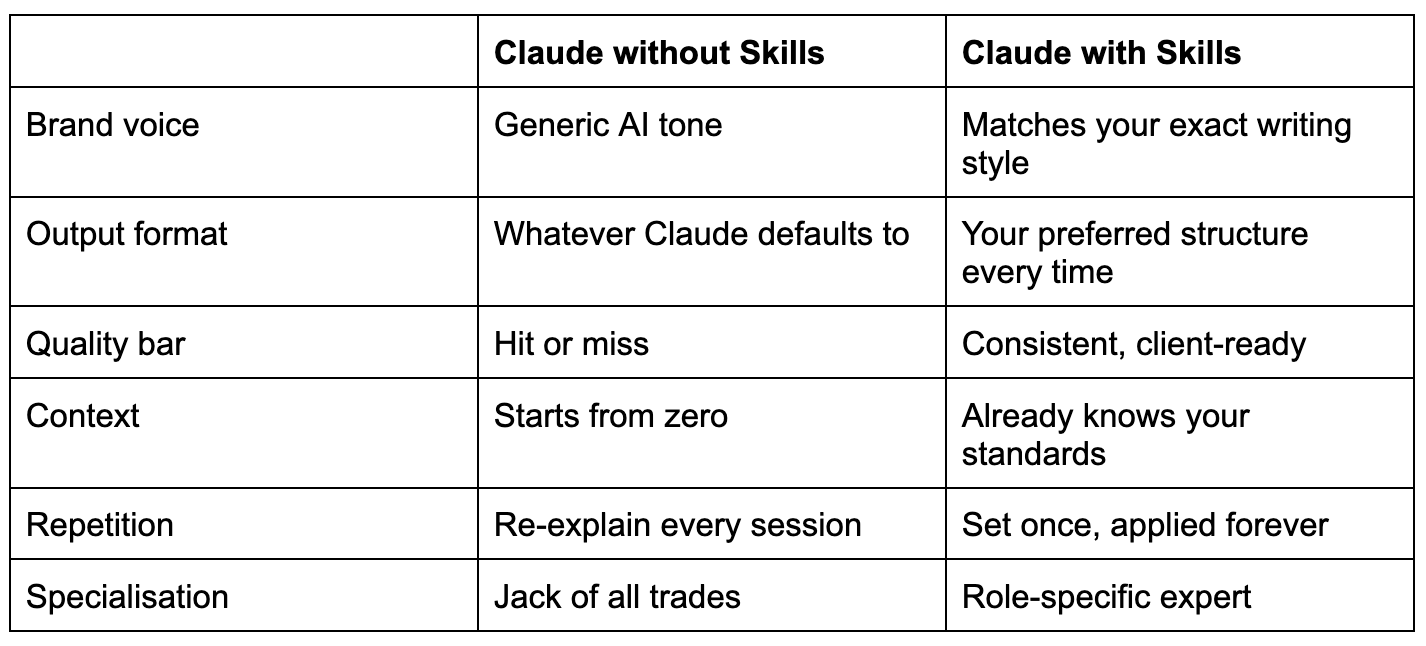
Skills are the single best thing you can set up in Claude. Everything else in this guide builds on this.
Where Skills live in Claude Code
This guide assumes you’re using Claude Code. It’s where Skills are most useful because Claude Code reads them automatically from your file system. Save a .md file to the right folder and it just works.
Here’s how Skills load in Claude Code:
Project-level Skills: Save .md files to .claude/skills/ in any project folder. Claude Code reads them automatically when you’re working in that project
CLAUDE.md files: Drop a CLAUDE.md file in any project root. Claude Code reads it at the start of every conversation. This is where your project-specific instructions live
Global Skills: Save to ~/.claude/skills/ for Skills that apply across all your projects (like your brand voice)
Skills also work across the wider Claude ecosystem. The same .md file is portable:
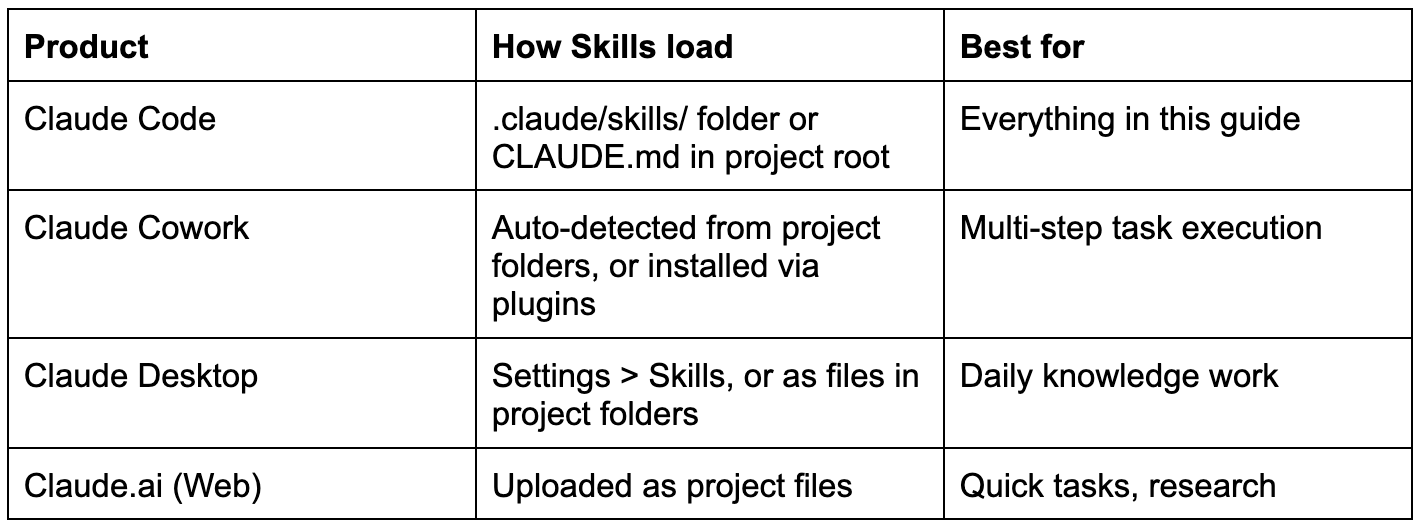
Practical takeaway: Start with Claude Code. Build your Skills in .claude/skills/. If you use other Claude products, the same files work there too.
The anatomy of a perfect Skill
Every effective Skill file has three parts. Miss one and the Skill underperforms. Nail all three and Claude actually starts working the way you do.
1. Name and description
The name is how you and Claude identify the Skill. Keep it clear and descriptive. Someone reading just the name should know exactly what it does.
The description tells Claude when to use it. This is the most critical part, and the one most people get wrong. A vague description means Claude won’t activate the Skill when it should.
Here’s the difference between descriptions that work and descriptions that don’t:
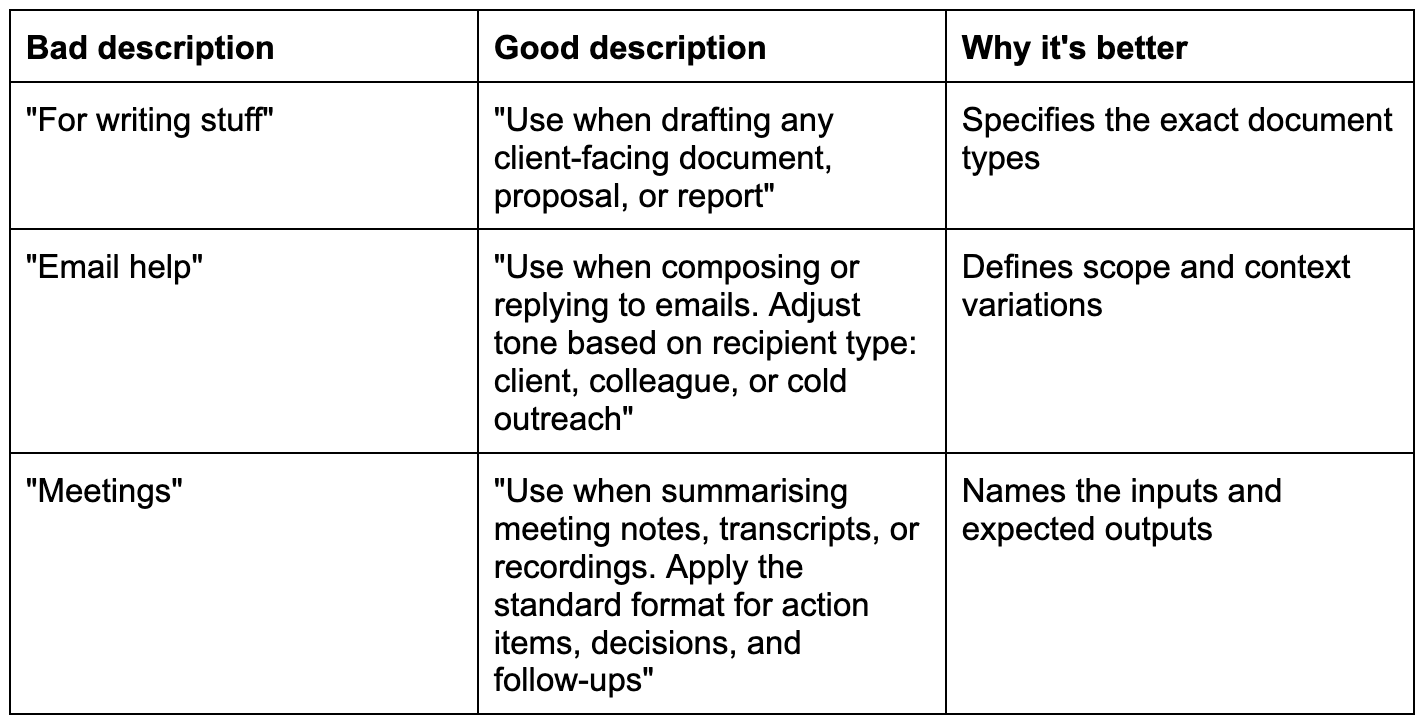
The pattern: be specific about the trigger, the scope, and the expected behaviour.
2. Instructions
This is the core of the Skill. Instructions are the rules and standards Claude follows when the Skill is active.
Write them as clear, numbered instructions. Be specific. Be opinionated. The more precise you are, the better Claude performs.
A few principles for writing great instructions:
Be prescriptive, not descriptive. Don’t say “good formatting.” Say “H2 for main sections, H3 for subsections, bullet points for lists of 3+ items.”
Include the negative. Tell Claude what NOT to do. “Never use passive voice in headlines” is clearer than “use active voice.”
Reference other Skills. If your brand voice Skill exists, point to it: “Follow the tone defined in brand-voice.md.” This creates a connected system.
Add decision rules. “If the document is longer than 2 pages, add a table of contents. If shorter, skip it.” Conditional logic makes Skills smarter.
The most common mistake: Being too generic. “Write well” is useless. “Write in short paragraphs, no jargon, no em-dashes, Australian English, confident but warm tone” is a Skill Claude can actually follow.
3. Examples and context
This is the part most people skip.
Examples show Claude what “good” looks like in your world. Rules tell Claude what to do. Examples show Claude how it should feel. Together, they’re what makes the output sound like you wrote it.
Include 2-3 examples of your actual work so Claude can pattern-match your style. Before/after examples work especially well.
Practical tip: Next time Claude produces output you love, copy it into the relevant Skill file under “Good output.” Next time it misses the mark, add it under “Bad output.” Your Skills get better over time this way.
The 5 Skills every professional should build first
These five Skills cover roughly 80% of knowledge work. Build them in this order. Each one builds on the last.
Skill 1: Brand voice
This is your foundation. Every other Skill references it. Without it, Claude defaults to generic AI tone. With it, Claude sounds like you.
# Skill: Brand Voice
Description: Use this skill for ALL written output. This defines my personal and professional writing voice. Apply these rules to every email, document, post, message, and deliverable unless I explicitly ask for a different tone.
## Voice Characteristics
- Tone: Direct, confident, warm, practical
- Register: Professional but conversational. Write like you’re talking to a smart colleague, not presenting to a board
- Energy: Optimistic and action-oriented. Focus on what’s possible, not what’s wrong
## Writing Rules
1. Use Australian English spelling (organise, colour, analyse, behaviour)
2. Short paragraphs only. 2-3 sentences maximum
3. Never use em-dashes. Use commas, full stops, or “not” instead
4. No corporate jargon: never say “leverage”, “synergy”, “circle back”, “touch base”
5. No filler phrases: remove “I think”, “it seems like”, “in order to”
6. Lead with the point. Don’t bury the insight at the end of a paragraph
7. Use concrete examples over abstract concepts
8. Bold key phrases for scannability in longer documents
9. Use contractions naturally (you’re, don’t, it’s, won’t)
10. End sections with a practical takeaway or clear next step
## Vocabulary Preferences
- Say “use” not “utilise”
- Say “help” not “facilitate”
- Say “start” not “commence”
- Say “about” not “regarding”
- Say “need” not “require”
- Say “show” not “demonstrate”
- Say “build” not “construct”
## Examples
### Good output (match this):
“Here’s the thing about growth. Most founders chase tactics. They want the hack, the shortcut, the one channel that will change everything. But sustainable growth comes from systems. Build the system first, the tactics plug in later.”
### Bad output (avoid this):
“In the rapidly evolving landscape of business growth, it is imperative that founders adopt a holistic approach to their growth strategy. By leveraging synergies across multiple channels and facilitating cross-functional collaboration, organisations can unlock transformative potential.”
Pro tip: Your brand voice Skill should be the first one you build AND the one you update most often. As your writing evolves, update the examples. This is a living document.
Skill 2: Meeting notes
Meetings are where decisions happen but context gets lost. This Skill ensures every meeting summary follows the same structure and makes follow-up effortless.
# Skill: Meeting Notes
Description: Use when summarising any meeting, call, or conversation. This includes processing transcripts, recordings, or handwritten notes.
## Instructions
1. Structure notes: Context > Key Decisions > Action Items > Open Questions > Follow-ups
2. Keep summaries concise. Someone who missed the meeting should get the full picture in 2 minutes of reading
3. Action items MUST include: the task, the owner, and the deadline. If no deadline was stated, flag it as “Deadline: TBD, needs confirmation”
4. Separate facts from opinions
5. Use present tense for decisions, future tense for actions
6. If the meeting had no clear decisions or actions, note that explicitly
7. Include attendee names and roles at the top
Pro tip: Pair this Skill with Claude’s audio transcription. Record your meeting, upload the transcript, and let Claude produce perfectly structured notes in seconds.
Skill 3: Client deliverables
Every document that leaves your desk represents your professional standard. This Skill keeps things consistent across every proposal, report, and strategy doc.
# Skill: Client Deliverables
Description: Use when creating any document intended for a client, partner, or external stakeholder. Includes proposals, reports, strategy documents, and presentations.
## Instructions
1. Open with an Executive Summary (3-5 sentences capturing the document’s value)
2. Clear header hierarchy: H1 for title, H2 for sections, H3 for subsections
3. Table of contents for any document longer than 3 pages
4. Attribution: “Prepared by [Your Name], [Company]” and date on the first page
5. All data claims must include a source
6. Use tables for any comparison of 3+ items
7. End with “Recommended Next Steps” (3-5 actionable items with owners)
8. Format currency as AUD unless otherwise specified
9. Australian English spelling
10. File naming: [Client]-[DocType]-[YYYY-MM-DD]
Skill 4: Email and communication
Email is the most frequent writing task for most professionals. It’s also the most inconsistent. This Skill keeps your tone right while adapting to different recipient types.
# Skill: Email and Communication
Description: Use when drafting, replying to, or editing any email, Slack message, or direct message. Adjust tone based on the recipient type below.
## General Rules
1. Keep emails short. 5 sentences or fewer for routine communication
2. Lead with the point. First sentence tells the reader why they’re reading
3. One email, one ask. Multiple things? Use a numbered list
4. Always end with a clear call to action or next step
5. Never use “Hope this email finds you well” or “Just following up”
6. Sign off with “Cheers,” for colleagues, “Best,” for clients, “Thanks,” when requesting
## Tone by Recipient
- Client: Warm, professional, confident. Restate commitments at the end.
- Colleague: Direct and casual. Skip the pleasantries. Bullet points for updates.
- Cold outreach: 3 sentences max. Lead with relevance. One low-friction CTA.
Skill 5: Research and analysis
Research is where Claude really earns its keep. But without a Skill, you get inconsistent depth and summaries that bury the insight.
# Skill: Research and Analysis
Description: Use when conducting research, analysing data, or synthesising information from multiple sources.
## Source Quality
1. Prioritise primary sources over secondary commentary
2. Prefer recent data (within 12 months) unless historical context is needed
3. Flag any source with commercial bias
4. Never present speculation as fact
## Summary Structure
1. Research Question: Restate what we’re trying to answer
2. Key Findings: 3-5 bullet points with the most important insights
3. Detailed Analysis: Organised by theme, not by source
4. Conflicting Information: Where sources disagree and which is more credible
5. Gaps: What couldn’t be determined?
6. Recommendations: Based on the evidence, what should we do?
Start with these five. They cover 80% of knowledge work. Once you’ve built these, you’ll see exactly how to create Skills for your specific workflows.
What I’ve actually built (and what it looks like in practice)
I want to show you what this looks like when you go past the basics. I’ve built 19 Skills in Claude Code that I use daily. Here’s a sample:
/linkedin-writer, /carousel, /invoice, /podcast-seo, /action-items, /linkedin-post-ideas, /save-context, and a bunch of web scraping and research skills.
Those are just names. Here’s what a few of them actually do.
The podcast transformer
I had a client with 142 podcast episodes on their website. Each page had about 80 words on it. A title and an embed. Basically invisible to Google.
So I built a /podcast-seo skill that pulls the transcript, generates a full SEO content hub with key insights, guest panels, timestamps, and schema markup, then pushes it straight to WordPress. Each page goes from 80 words to roughly 13,000. And it runs the same way for every episode.
The LinkedIn writer
I scraped over 1,000 viral LinkedIn posts and broke down what made them work. The hook patterns, the structures, the formatting, the psychology. All of that got fed into a /linkedin-writer skill with 7 proven post formats baked in.
Now I say “write a LinkedIn post about X” and it picks the best format for the topic, matches my voice, and gives me two drafts in different structures so I can choose. My best-performing posts this year came from that skill.
The personal CRM
I built a system that pulls together my emails, iMessages, WhatsApp messages, LinkedIn DMs, and meeting transcripts into one searchable database.
Before a meeting, I ask “what’s my history with this person?” and get every conversation we’ve had across every channel. What we discussed. Their business updates. What they were working on last time we spoke. No more “sorry, remind me where we left off.”
Ghostbuster
I get a lot of messages across a lot of channels. Emails, iMessages, WhatsApp, LinkedIn DMs. It’s hard to manage all of the messages and things just slip through when you’re moving fast.
So I’m building a system called “Ghostbuster” that scans all of those channels, finds conversations where someone is waiting on a reply from me, and sends me a digest three times a day. It tells me who I owe a response to and on which channel. I’m still refining the workflow, but the fact that I can even attempt something like this with Claude Code and a few Skills should tell you where this is heading.
How to build a Skill in 5 minutes
I’ll give you two paths: the fast way (let Claude build it for you) and the manual way.
The fast way: let Claude Code build your Skills for you
This is how I do it. You don’t need to write Skill files from scratch. Claude Code can read your existing work, spot your patterns, and create the files for you.
Open Claude Code in your project folder. If you don’t have a .claude/skills/ folder yet, that’s fine. Claude Code will create it
Give it something you’ve already written. Paste in 2-3 emails, a proposal, a LinkedIn post, whatever represents your voice. Then say: “Based on these examples, create a brand-voice.md skill file in .claude/skills/ that captures my writing style, tone, and preferences.”
Review what Claude Code produces. It’ll create the file with your voice characteristics, writing rules, vocabulary preferences, and examples. Read it. Does it sound right?
Tell Claude Code to sharpen it. This is where you add the stuff it can’t figure out on its own. “Add a rule: never use em-dashes. Add a rule: always use Australian English. Add to the bad output section: anything that sounds like corporate jargon.” Be opinionated. The more specific, the better
Test it immediately. In the same Claude Code session, say: “Write a 3-paragraph LinkedIn post about why most professionals are underusing AI tools.” Does it sound like you? If not, tell Claude Code what’s off and it’ll update the Skill file right there
Iterate. The Skill lives at .claude/skills/brand-voice.md. Every future Claude Code session in that project reads it automatically
The manual way
If you prefer to write Skill files yourself, open any text editor and create a .md file with the three parts: name and description (when should Claude use this?), instructions (numbered rules), and examples (2-3 samples of your actual work, plus “bad output” to avoid). Save it to .claude/skills/ in your project folder. Done.
Most people find the Claude Code approach faster. It’s often better too, because it spots patterns in your writing that you might not articulate yourself.
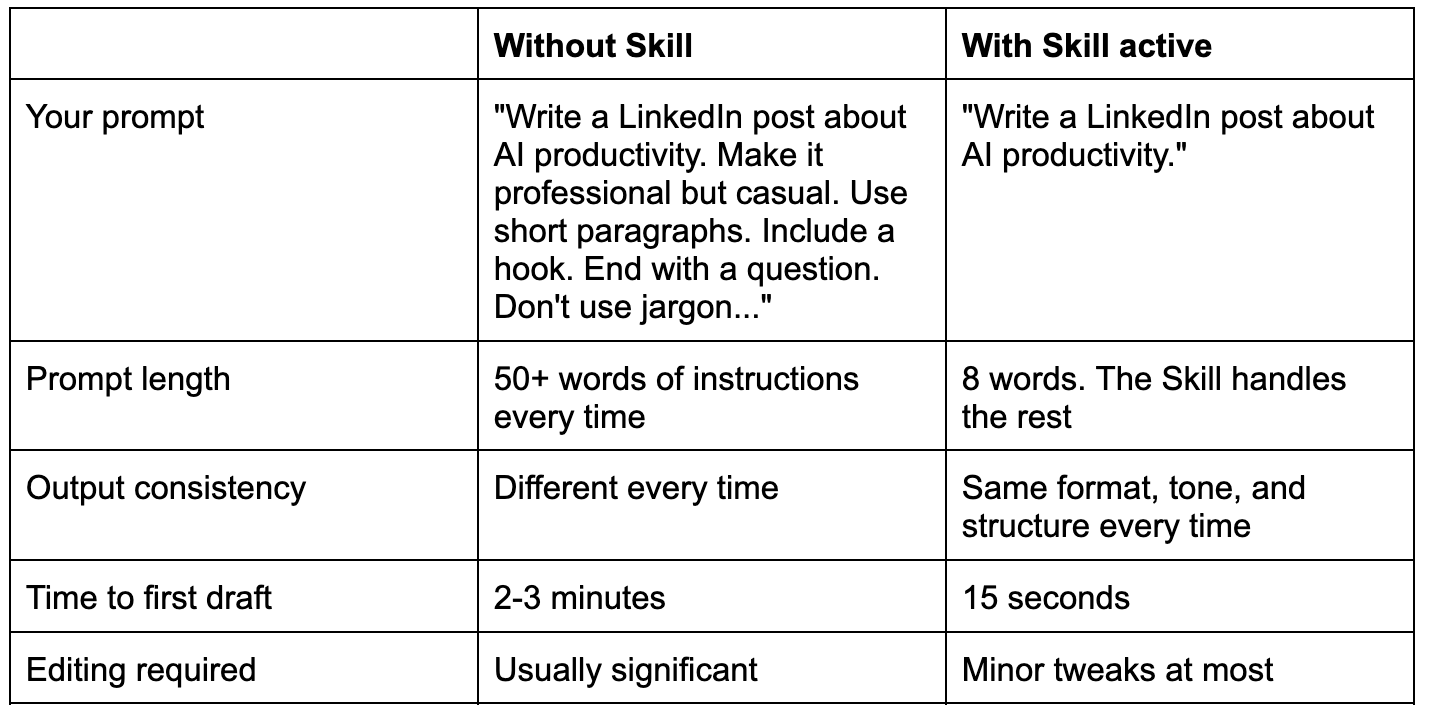
Here’s what the same task looks like with and without a Skill active:
Levelling up: debugging and power user tips
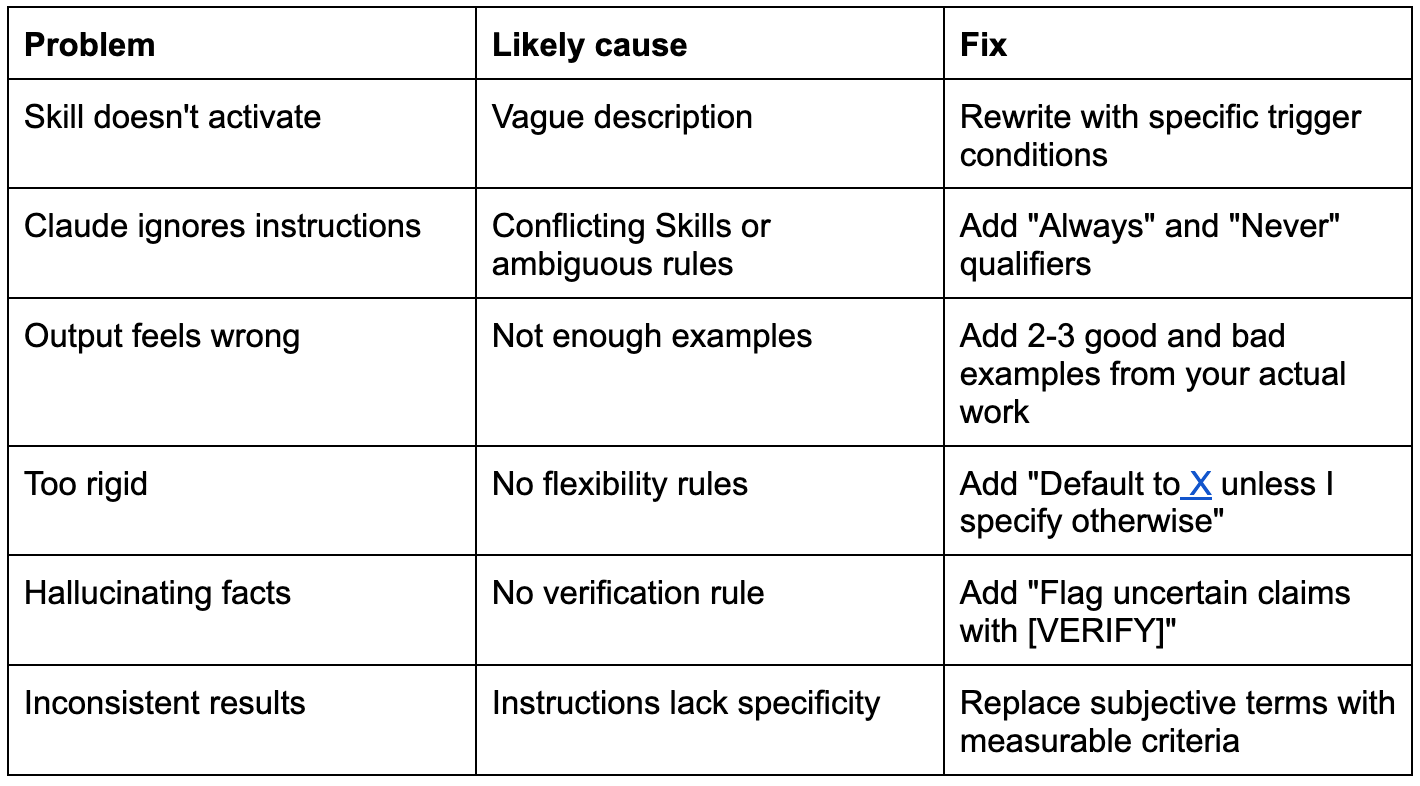
When Claude ignores your instructions
It happens. Here’s the quick reference:
Power user tips
Use CLAUDE.md in every project root folder. Claude Code reads it automatically at the start of every session. Drop in your project brief, client requirements, or working preferences and Claude Code picks them up from the first prompt.
Create a “meta-skill” that builds Skills. Tell Claude how you want Skills structured, then say “Create a skill for X” and it follows your format. A Skill that builds Skills. Yes, it’s recursive and slightly ridiculous, but it works.
Version your Skills. When you improve one, save it as v2. Keep the old version so you can roll back. Simple naming: brand-voice-v1.md, brand-voice-v2.md.
Audit your Skills quarterly. Your work changes. Your standards evolve. Set a calendar reminder to review and refine your top 5 Skills every quarter.
Use Skills as training data. When Claude produces great output, extract the patterns and add them to the relevant Skill. When it misses, add the bad output to “avoid this.” They get smarter over time.
Pair Skills with scheduled tasks. In Claude Code, you can set up recurring tasks that run on a schedule. A Skill plus a schedule equals work that happens automatically to your exact standards.
Your first 15 minutes with Skills
Stop reading. Start building.
Open Claude Code in any project folder you work in regularly
Paste in 2-3 examples of your writing (emails, posts, proposals, whatever represents your voice) and say: “Based on these examples, create a brand-voice.md skill file in .claude/skills/ that captures my writing style.”
Review the Skill file Claude Code creates. Does it capture your tone? Your pet peeves? Your formatting preferences?
Sharpen it. Tell Claude Code what to add or change. “Never use em-dashes.” “Always Australian English.” “Add this paragraph to the bad output section.” Be specific
Test it. In the same session, say: “Write a 3-paragraph LinkedIn post about why most professionals are underusing AI tools.” Check the output. Does it sound like you wrote it?
Build your second Skill. Say: “Create a meeting-notes.md skill in .claude/skills/ that structures all my meeting summaries with context, decisions, action items, and follow-ups.”
Test that one too. Paste in a rough transcript or meeting notes and see if the output matches your standard
Keep going. Add a client-deliverables Skill. An email Skill. Each one takes about 5 minutes. Each one saves you hours
Ready to go deeper? Join the live workshop. 90 minutes, all three Claude tools, hands-on setup. You’ll leave with Cowork configured, your first 3 Skills built, and a Claude Code demo. Two sessions to fit your timezone.
Session 1: Thu April 16, 3pm AEST → Register here
Session 2: Thu April 21, 10am AEST → Register here
This guide was written by Jeremy Cabral, co-founder of Finder (bootstrapped to $100M+ in revenue), now a growth advisor helping founders scale.
If this was useful, share it with someone who could use an extra 8+ hours back in their week.
Subscribe to get the next guide in this series (More Claude playbooks are coming): newsletter.jeremycabral.com
The context gap is REAL! Thank you for sharing this! I have been starting to play around with this and appreciate all the material out there, like this :)